Product Description & Technical Details
Product Description
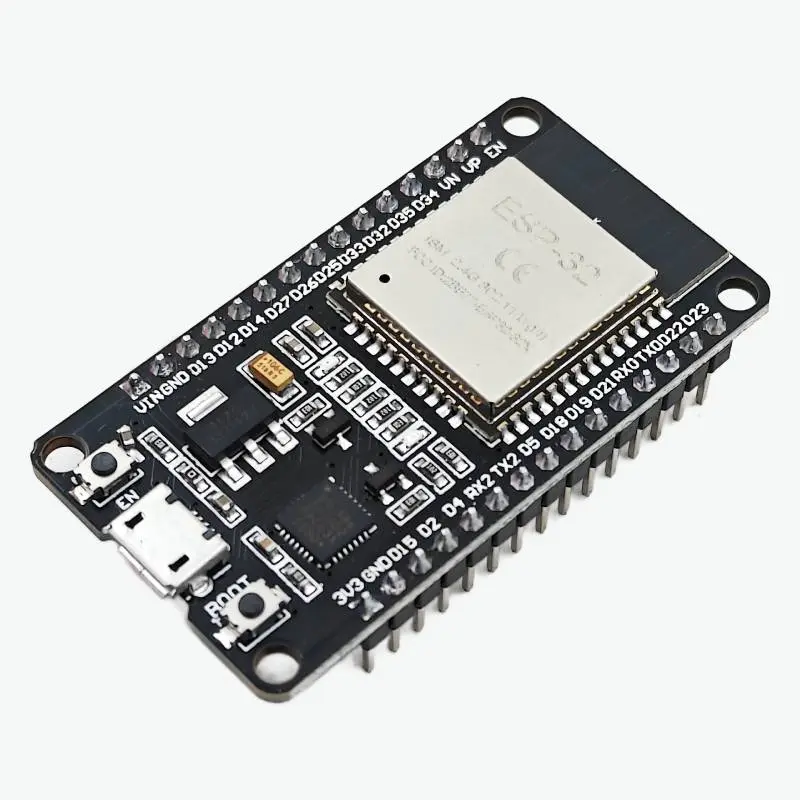
The 30-Pin CP2102 ESP32 Development Board is a high-performance, industry-standard platform for building Internet of Things (IoT) applications. This version is centered around the classic Micro-USB interface and utilizes the premium Silicon Labs CP2102 chip for USB-to-UART communication. Unlike cheaper clones, the CP2102 offers superior driver stability on all operating systems and handles high-speed code uploads with ease. The onboard ESP-WROOM-32 module provides a powerful dual-core processor, allowing you to dedicate one core to high-speed wireless networking while the other manages complex logic, sensors, or motor control.
Key Highlights
Dual-Core Processing: Powered by two Xtensa® 32-bit LX6 microprocessors, capable of reaching speeds up to 240 MHz for high-speed multitasking.
Stable CP2102 Serial IC: Features the high-quality Silicon Labs bridge, ensuring your board is recognized instantly by your PC and doesn't disconnect during long serial debugging sessions.
Hybrid Wireless Connectivity: Supports both WiFi for cloud integration and Bluetooth (Classic + BLE) for connecting directly to smartphones or low-power sensors.
Massive Peripheral Support: Includes access to 12-bit ADCs, 8-bit DACs, capacitive touch sensors, SPI, I2C, I2S, and hardware UARTs.
Breadboard Compatible: The narrow 30-pin form factor leaves one row of holes free on each side of a standard breadboard, making prototyping much easier.
Technical Specifications
SRAM: 520 KB
External Flash: 4 MB (Standard)
Clock Frequency: Adjustable from 80 MHz to 240 MHz
WiFi Security: WPA/WPA2/WPA2-Enterprise/WPS
Operating Temperature: -40°C to +85°C
Dimensions: ~52mm x 28mm
Installation Tip from Robogears
The CP2102 driver is usually built into Windows 10/11 and macOS, but if your board isn't detected, download the "CP210x USB to UART Bridge VCP Drivers" from Silicon Labs. In the Arduino IDE, use the board manager to install the "esp32" package and select "DOIT ESP32 DEVKIT V1" or "ESP32 Dev Module". If the upload hangs at "Connecting...", simply press and hold the 'BOOT' button on the module until the upload starts. Always use a high-quality Micro-USB data cable; many cheap cables are "power-only" and will not allow the computer to see the board.
Note: The product images provided are for illustration purposes only. The actual product may vary slightly in terms of design, color, or component layout due to manufacturing updates, but technical specifications will remain as described.