Skip to Content

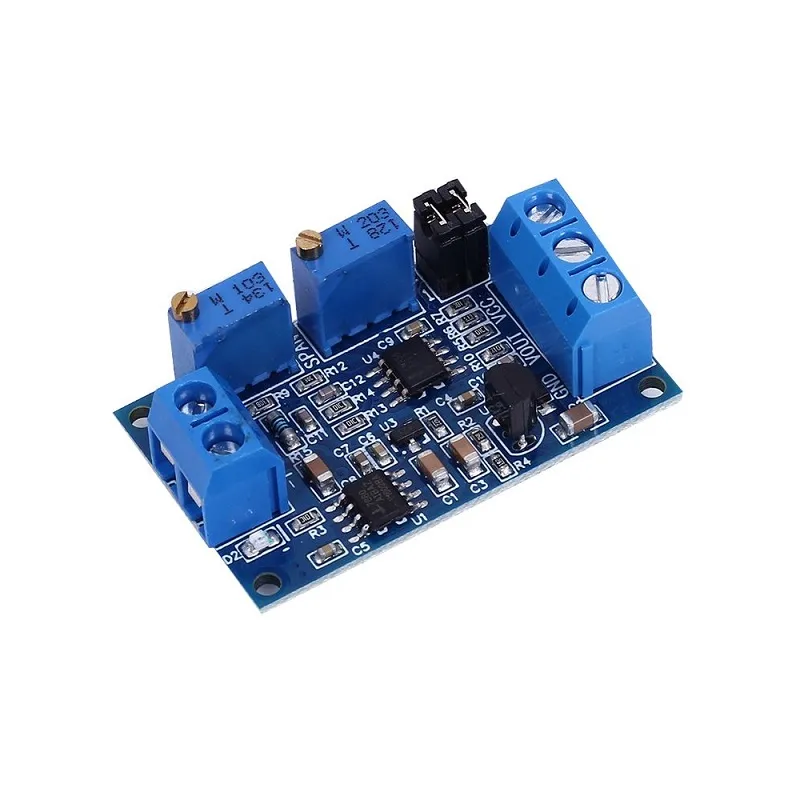
4-20mA to 5V Converter for Arduino Industrial Sensor Interface Board

(0 review)
FeatureDetails
Input Signal4mA to 20mA (Industrial Standard)
Output Signal0V to 3.3V / 5V / 10V (Adjustable)
Supply Voltage7V to 35V DC
Onboard ICHigh-Precision Operational Amplifier
CalibrationZero and Span Adjustment Potentiometers
ProtectionReverse Polarity & Surge Protection
Price
₹ 118.64 ₹ 118.64
(Tax included)
Product Description & Technical Details

Product Description The 4-20mA Current to Voltage Converter is an essential interface module for connecting industrial-grade sensors (like pressure transmitters, flow meters, and temperature probes) to microcontrollers like Arduino, ESP32, or PLCs. In industrial environments, signals are transmitted as current (4-20mA) to prevent signal loss over long distances. This module accurately converts that current into a proportional voltage signal (typically 0-5V or 0-3.3V) that a microcontroller’s Analog-to-Digital Converter (ADC) can read. At Robogears, we recommend this for any project transitioning from lab-scale prototyping to industrial-grade sensing.

Key Highlights

  • Industrial Compatibility: Seamlessly bridges the gap between 2-wire or 3-wire 4-20mA transmitters and low-voltage logic controllers.

  • Highly Adjustable: Features two multi-turn potentiometers:

    • Zero (Zero Point): Used to set the output voltage when the input current is at 4mA.

    • Span (Full Scale): Used to set the maximum output voltage when the input current is at 20mA.

  • Wide Supply Range: Can be powered by a wide range of DC voltages (7-35V), allowing it to run directly off a standard 12V or 24V industrial power supply.

  • Reliable Isolation: Designed with circuit protection to handle common-mode noise often found in factory environments.

  • Compact Design: Small footprint with easy-to-use screw terminals for secure industrial wiring.

Technical Specifications

  • Input Impedance: ~250 Ohms

  • Output Linearity: 0.2% High Precision

  • Temperature Drift: ±100ppm/°C

  • Dimensions: ~42mm x 25mm

  • Mounting: 2 x 3mm fixing holes for chassis mounting

Installation & Calibration Tip from Robogears

  1. Power Up: Connect a DC power supply (e.g., 24V) to the VCC and GND terminals.

  2. Zero Calibration: Apply a 4mA signal to the input. Adjust the Zero potentiometer until your multimeter reads 0V (or 0.5V if preferred) at the output.

  3. Span Calibration: Apply a 20mA signal to the input. Adjust the Span potentiometer until the output reads exactly 5V (for Arduino) or 3.3V (for ESP32).

  4. Wiring: Ensure you are using shielded cables for the 4-20mA loop if the sensor is located more than 10 meters away to minimize electromagnetic interference.

Note: This module is a signal converter only. It requires an external DC power supply to operate. Product images are for illustration purposes only.