Product Description & Technical Details
Product Description
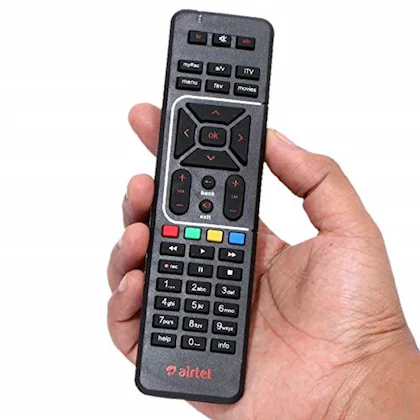
The Replacement Remote for Airtel Digital TV is a high-quality, durable remote control designed specifically to replace lost or damaged Airtel Set-Top Box remotes. It features a familiar layout that includes all standard navigation keys, volume/channel toggles, and shortcut buttons for home, menu, and recording. This remote is pre-programmed, meaning it works right out of the box with most Airtel DTH boxes without the need for complex code entries or pairing. Its lightweight and ergonomic design ensure comfortable long-term use.
Key Highlights
Instant Compatibility: Designed to work seamlessly with Airtel HD and SD Set-Top Boxes; simply insert batteries and start using it immediately.
Full Functional Coverage: Includes all essential buttons, such as the Red/Green/Yellow/Blue interactive keys, Mute, and Information, ensuring no loss of features compared to the original.
Robust Build Quality: Manufactured from premium ABS plastic with soft-touch rubber buttons that are tested for thousands of clicks to ensure longevity.
Precise IR Signal: Features a wide-angle infrared transmitter that provides a strong signal, allowing you to control your TV box even if you aren't pointing directly at it.
Battery Efficiency: Optimized circuit design ensures long battery life, reducing the frequency of battery replacements.
Technical Specifications
Transmission Mode: IR (Infrared)
Carrier Frequency: 38kHz
Number of Keys: Standard DTH Layout
Dimensions: ~18cm x 5cm x 2cm
Weight: ~75g (without batteries)
[Image showing the battery compartment of the remote requiring 2 AAA cells]
Prototyping & Installation Tip
If the remote does not respond initially, ensure that the infrared sensor on your Set-Top Box is not obstructed by decorative items or glass. To verify if the remote is sending a signal, point it at your smartphone's camera and press a button; you should see a purple/white flickering light on the screen (the camera can see IR light that the human eye cannot). Always use high-quality Alkaline AAA batteries to prevent leakage that could damage the internal PCB.
[Image demonstrating the "Smartphone Camera Test" to check IR remote functionality]
Note: This is a replacement remote control. It does not include batteries or the Set-Top Box. Product images are for illustration purposes only.