🔧 Prototyping and Engineering Tips from RoboGears
1. Remember That This Is a Decoder
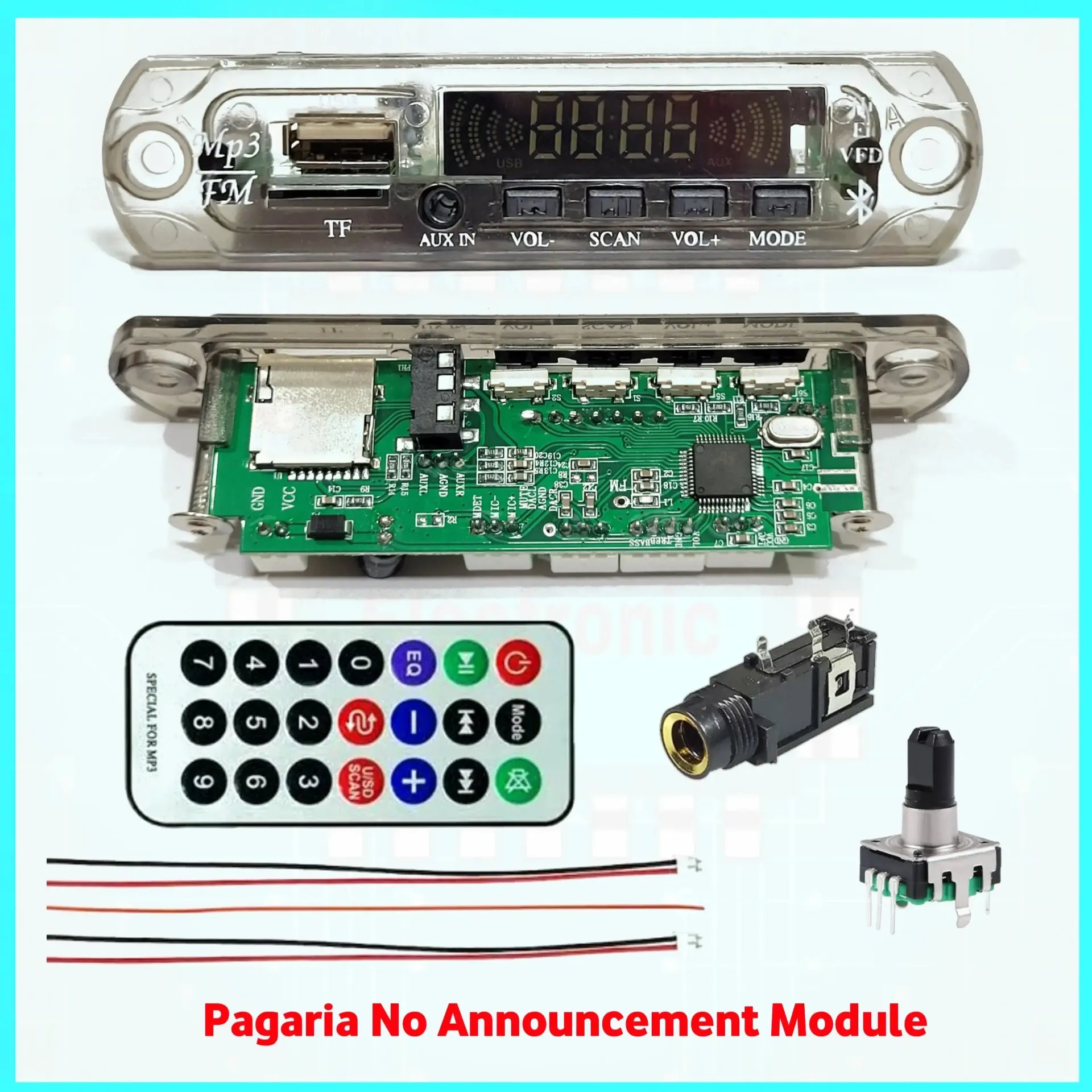
The PAG-VI150 is the audio-source stage.
It provides:
Bluetooth / USB / TF / FM / AUX → Stereo Audio Output
An external power amplifier is required to drive passive speakers.
2. Do Not Connect Passive Speakers Directly
The audio output is line-level.
Connect:
PAG-VI150 → Amplifier → Speakers
not:
PAG-VI150 → Passive Speakers
3. Keep the Supply Within 5V–12V
Published operating range:
DC 5V–12V
Do not directly connect:
amplifier supplies.
Use an appropriate regulator when the main audio system operates at a higher voltage.
4. Use a Clean Power Supply
Decoder modules process low-level audio signals and can pick up power-supply noise.
A noisy supply can cause:
Hum
Buzz
Digital noise
Bluetooth noise
Switching interference
Use a stable regulated supply.
5. Shared Power Can Create Noise
When the decoder and amplifier share the same power source, noise or ground-loop problems can sometimes occur.
If noise appears, check:
Do not automatically assume electrical isolation is required.
6. Keep Line-Level Wiring Short
Keep the decoder-to-amplifier audio wires:
Short
Away from speaker outputs
Away from SMPS switching sections
Away from high-current wiring
Shielded audio cable can help in electrically noisy installations.
7. FLAC Support Does Not Mean Lossless Bluetooth
The module supports FLAC and APE files according to the published specification.
This establishes local file compatibility.
It does not establish a lossless Bluetooth codec.
Avoid advertising:
Lossless Bluetooth
unless the Bluetooth codec is independently verified.
8. Don't Advertise Low-Latency Bluetooth
Bluetooth 5.0 alone does not establish low-latency audio performance.
Codec and implementation determine latency.
Avoid the claim:
Low-Latency Bluetooth
unless measured or chipset documentation confirms it.
9. Be Conservative With FM Antenna Length
The current page recommends a specific 75cm wire.
Without manufacturer antenna-design documentation, a safer instruction is:
Connect a suitable wire antenna to the designated ANT pad and optimize its placement for reception.
Keep the antenna away from:
SMPS circuitry
High-current wiring
Amplifier output wiring
Large metal objects
10. Rotary Encoder Wiring Must Match the Board
Do not use a generic rotary-encoder pinout without checking the actual PAG-VI150 PCB.
Verify the board markings before installation.
11. Start the Amplifier at Low Volume
When switching between Bluetooth, USB, AUX and FM sources, signal levels may differ.
Start the external amplifier at a moderate level before changing sources.
12. Keep the IR Receiver Visible
If mounting the decoder behind a front panel, ensure the IR receiver has a suitable line of sight to the remote.
13. Don't Guarantee Display Visibility in Direct Sunlight
The white LED display provides a clear visual interface, but avoid claims such as:
“Excellent visibility even in bright environments”
unless tested.
14. Verify Future Batches
Decoder boards can undergo PCB and chipset revisions.
When receiving a new batch, verify:
Bluetooth operation
USB
TF
AUX
FM
Voice prompts
Remote
Encoder
Display
Output connections
before assuming every previous specification remains unchanged.
Common Troubleshooting
Bluetooth Connects but No Speaker Sound
Check the decoder-to-amplifier connection, amplifier power and speaker wiring.
USB Does Not Play
Check file format, USB device and stored files.
TF Card Does Not Play
Check card installation, file compatibility and playback mode.
FM Reception Is Weak
Check antenna connection, antenna placement and local signal strength.
Hum or Buzz
Check power quality, signal grounding and audio-cable routing.
Remote Does Not Work
Check line of sight and remote battery.
Decoder Restarts at High Amplifier Volume
Check for supply-voltage drop or shared-power problems.
Engineering Principle
For a clean multimedia audio system:
Clean Power + Correct Line-Level Wiring + Compatible Amplifier + Good Grounding
are essential.